AI Risk Readiness · Third-Party AI

The AI You Never Bought. It Came With Your Software.

If your organisation has an approval process for new AI, it may not run when the vendor of your office suite, CRM or service desk adds an AI feature to a product you already license. A setting appears in the admin console. Someone switches it on, and your data can reach a model under a contract signed before the feature existed. No purchase order is needed. In your network logs it usually looks like ordinary use. The admin console shows it, but it is rarely reviewed with AI in mind.

Last reviewed against the regulators’ texts on 24 November 2026. Rules change; check the Sources at the end before you act on this chapter.
Infozense · 24 November 2026 · CIO · CISO · DPO · Procurement · ~8 minutes

Chapter 2 asked, in question 2, how many licensed services have AI features switched on, and how many of those appear in the register. This chapter covers that route in, one that is easy to miss: AI features switched on inside software you already license. It ends with a checklist for each admin console, and where each answer belongs in the records you already keep.

Why this matters. An AI feature switched on in licensed software raises the same questions as AI you built: where personal data goes and on what terms, what happens when the model changes, and what stops when it fails. The difference is that it may never have been written down.

When the contact centre’s summarising feature stops working, or its summaries change because the vendor changed the model behind it without notice, the first question becomes "since when do we use AI there?". That is awkward to answer in front of an auditor, and the cause is simple: nobody recorded the feature.

For most of the last decade, adopting AI meant a project: a business case, a selection, a purchase order. Each step could add a register row.

That is no longer the only route. The software you already run is gaining AI features release by release. Some arrive switched off and wait for an administrator. Some arrive switched on. Some need an add-on licence a team admin can assign in a few clicks.

None of these steps needs a purchase order. Not all of them pass through change management. Unless someone tells it, the register does not hear about them.
Who this is for

The CIO and CISO who own the SaaS estate, the DPO who answers for where personal data goes, and the procurement and vendor-management teams who hold the contracts.

It applies to any regulated organisation that licenses mainstream business software. Banking is the worked example, as in chapters 1 and 2; the checklist does not depend on the sector.

Below the waterline

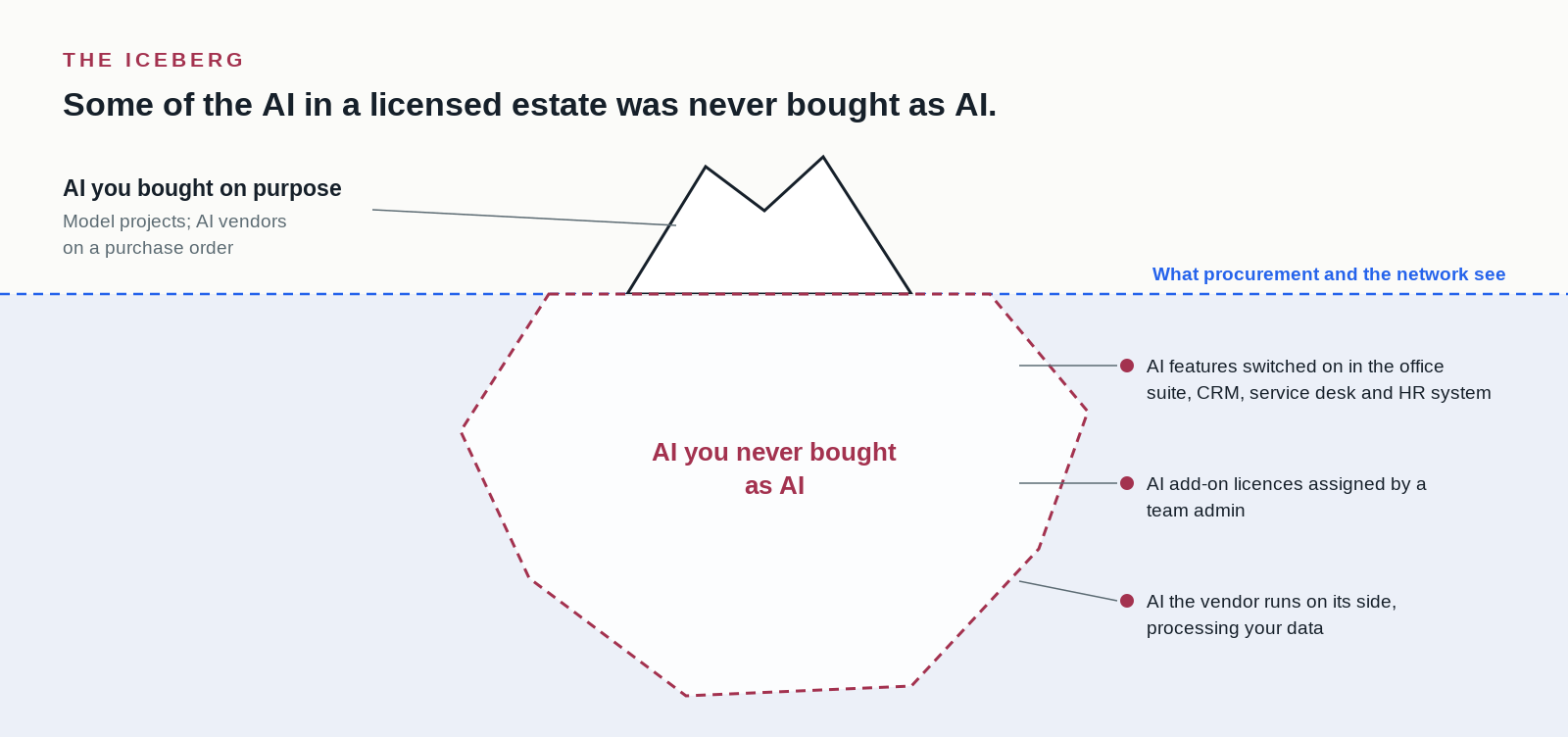
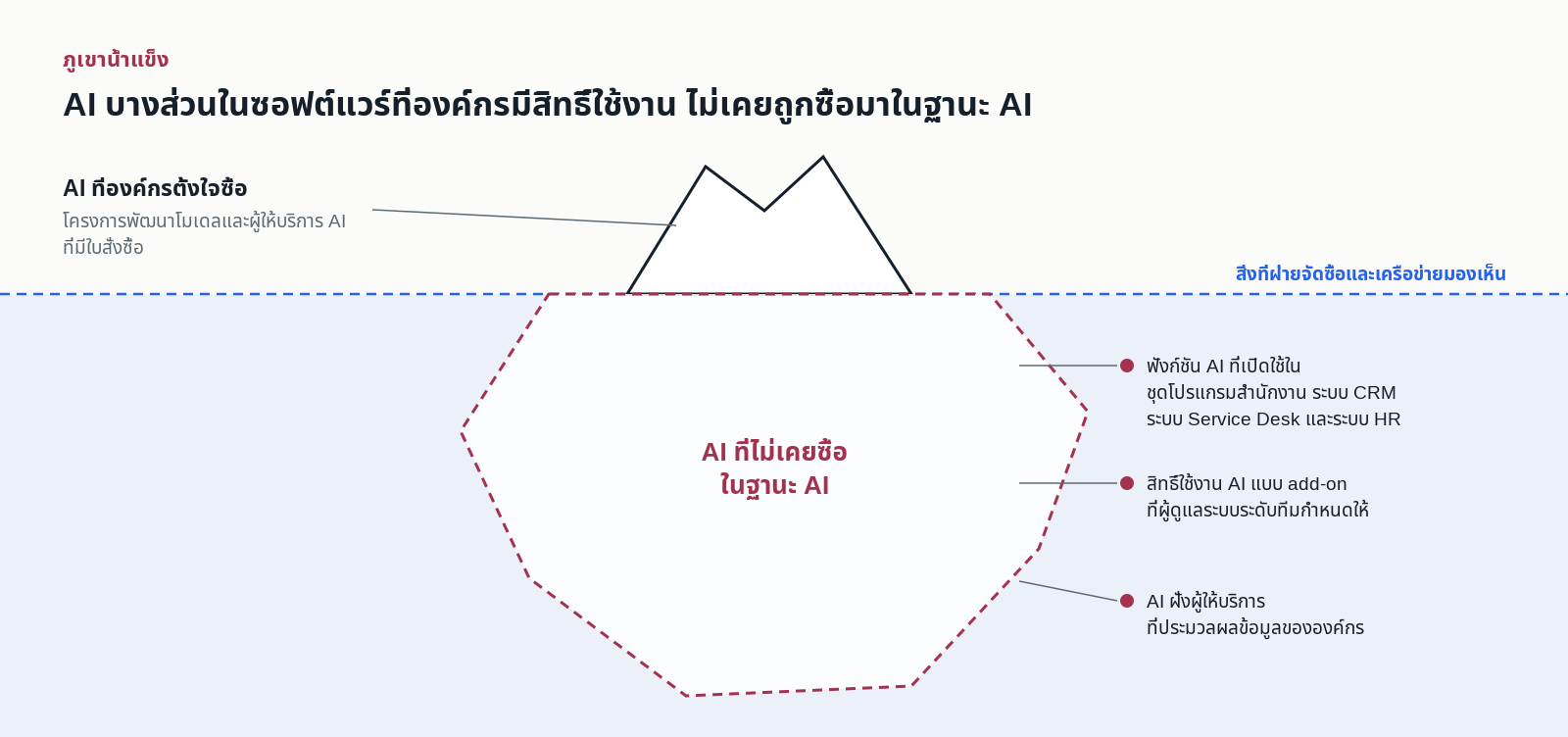
Picture your AI estate as an iceberg. Above the water is the AI you bought on purpose: model projects and AI vendors on a purchase order. Procurement sees it and so does the network.

An iceberg. Above the waterline, labelled what procurement and the network see: AI you bought on purpose, such as model projects and AI vendors on a purchase order. Below the waterline: AI features switched on in the office suite, the CRM, the service desk and the HR system; AI add-on licences assigned by a team admin; and AI the vendor runs on its side that processes your data. ภาพภูเขาน้ำแข็ง ส่วนเหนือผิวน้ำมีป้ายระบุว่าเป็นสิ่งที่ฝ่ายจัดซื้อและเครือข่ายมองเห็น คือ AI ที่องค์กรตั้งใจซื้อ เช่น โครงการพัฒนาโมเดลและผู้ให้บริการ AI ที่มีใบสั่งซื้อ ส่วนใต้ผิวน้ำ ได้แก่ ฟังก์ชัน AI ที่เปิดใช้ในชุดโปรแกรมสำนักงาน ระบบ CRM ระบบ Service Desk และระบบ HR สิทธิ์ใช้งาน AI แบบ add-on ที่ผู้ดูแลระบบระดับทีมกำหนดให้ และ AI ฝั่งผู้ให้บริการที่ประมวลผลข้อมูลขององค์กร
Some of the AI in a licensed estate was never bought as AI.

Below the water is everything else:

  • AI features switched on in the office suite, the CRM, the service desk and the HR system;
  • AI add-on licences assigned by a team administrator rather than bought centrally;
  • AI processing your data on the vendor's side as part of a feature you think of as ordinary, such as search, summarising or drafting.

The part below the waterline may be larger. It also touches more people, because it sits inside tools staff use every day.

Why your proxy usually misses it

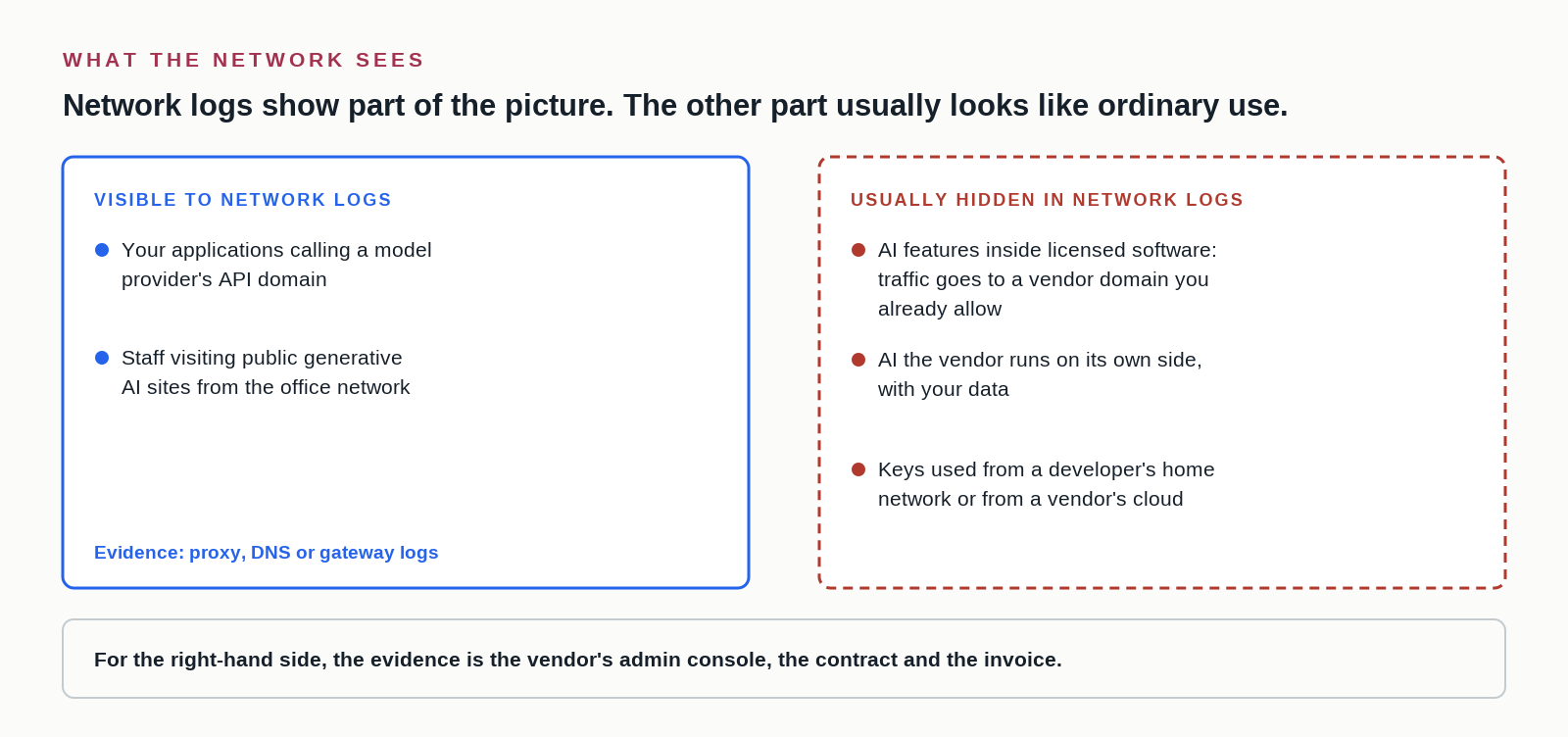
When an application calls an AI provider's API, the call leaves your network for the provider's domain, and a proxy or firewall log can see it.

When a feature inside your CRM summarises a customer record, the traffic goes to the CRM vendor's domain. Your network already allows that domain, because the CRM is in daily use. Whatever AI processing happens, it happens on the vendor's side.

A split figure. Left, visible to network logs: calls from your own applications to a model provider's API domain, and staff visiting public generative AI sites. Right, usually hidden in network logs: AI features inside licensed software, whose traffic goes to a vendor domain you already allow; AI the vendor runs on its own side with your data; and keys used from a developer's home network or a vendor's cloud. Bottom line: for the right-hand side, the evidence is the vendor's admin console, the contract and the invoice. ภาพแบ่งสองฝั่ง ฝั่งซ้ายคือสิ่งที่ log ของเครือข่ายมองเห็น ได้แก่ แอปพลิเคชันขององค์กรที่เรียกใช้โดเมน API ของผู้ให้บริการโมเดล และพนักงานที่เข้าเว็บไซต์ Generative AI สาธารณะ ฝั่งขวาคือสิ่งที่ log ของเครือข่ายมักมองไม่เห็น ได้แก่ ฟังก์ชัน AI ในซอฟต์แวร์ที่องค์กรมีสิทธิ์ใช้งาน ซึ่งส่งข้อมูลไปยังโดเมนของผู้ให้บริการที่องค์กรอนุญาตไว้แล้ว AI ที่ทำงานอยู่ฝั่งผู้ให้บริการโดยใช้ข้อมูลขององค์กร และคีย์ API ที่ใช้จากเครือข่ายที่บ้านของนักพัฒนาหรือจากคลาวด์ของผู้ให้บริการ บรรทัดล่างระบุว่า หลักฐานของฝั่งขวาคือหน้าจอผู้ดูแลระบบของผู้ให้บริการ สัญญา และใบแจ้งหนี้
Network logs show part of the picture. For the other part, the evidence is the admin console, the contract and the invoice.

So in proxy and DNS logs, a user asking the CRM to summarise a file is usually indistinguishable from a user opening the file. A security tool that inspects the content of traffic may see more, and some features call a separate AI address, but even then the log does not say which features are switched on or what the contract allows. Watching the traffic that leaves your network is a good control for the AI you build. For this kind, the evidence sits elsewhere.

Where it is visible

Embedded AI leaves evidence in three places you already have access to:

  • The admin console. It lists which AI features are available, which are switched on and for whom, and, in the console's own history of changes (the audit log), who changed the setting and when.
  • The contract. It says whether your data may train the vendor's models, where processing happens, and whether the vendor must tell you before it adds AI features.
  • The invoice. AI add-on licences show up as line items, sometimes on a team's own card rather than central procurement.

Chapter 3 names this as one of the three ways AI gets in without a register row; checking the console against the register is how you find it. A dated export of the settings is the evidence for question 2 in chapter 2. The console shows the current state only, so the date matters.

The checklist for each admin console

An administrator can answer most of these from each console; the contract questions go to whoever holds the contract.

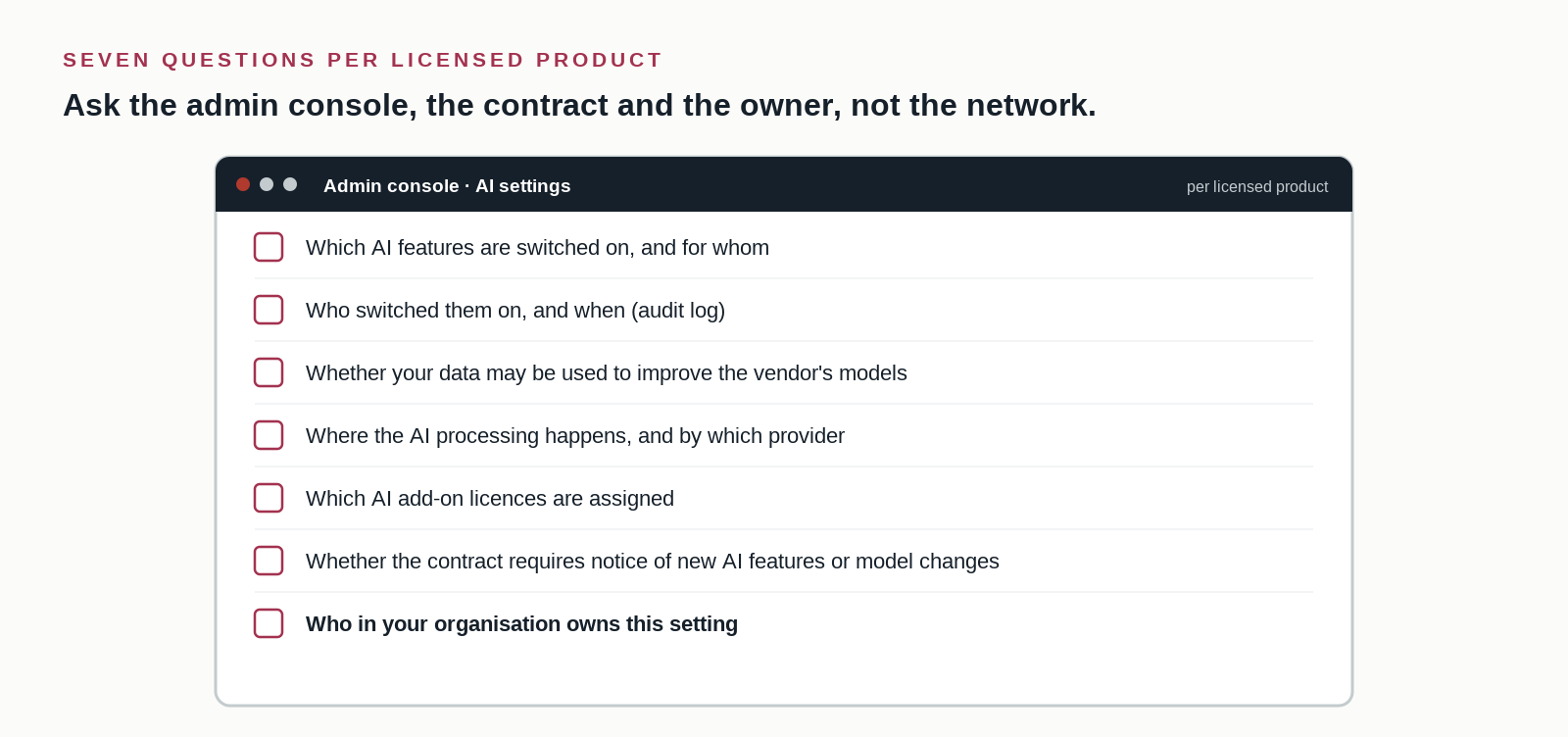
A generic admin console card titled AI settings, with seven unchecked items: which AI features are switched on, and for whom; who switched them on, and when, from the audit log; whether your data may be used to improve the vendor's models; where the AI processing happens, and by which provider; which AI add-on licences are assigned; whether the contract requires notice of new AI features or model changes; and who in your organisation owns this setting. การ์ดหน้าจอผู้ดูแลระบบแบบทั่วไป หัวข้อการตั้งค่า AI มีคำถามตรวจสอบเจ็ดข้อที่ยังไม่ได้ทำเครื่องหมาย ได้แก่ ฟังก์ชัน AI ใดเปิดใช้อยู่และเปิดให้ใคร ใครเป็นผู้เปิดใช้และเปิดเมื่อใดตาม audit log ผู้ให้บริการนำข้อมูลขององค์กรไปปรับปรุงโมเดลของตนได้หรือไม่ การประมวลผล AI เกิดขึ้นที่ใดและผู้ให้บริการรายใดเป็นผู้ประมวลผล กำหนดสิทธิ์ใช้งาน AI แบบ add-on ให้ใครบ้าง สัญญากำหนดให้แจ้งล่วงหน้าหรือไม่เมื่อมีฟังก์ชัน AI ใหม่หรือเปลี่ยนโมเดล และใครในองค์กรเป็นเจ้าของการตั้งค่านี้
Seven questions per licensed product. The answers are in the admin console, the contract and the owner's head.
  • Which AI features are switched on, and for which users or groups? (Chapter 2, question 2.)
  • Who switched each one on, and when? The console's history of changes may say.
  • Does the feature receive personal data, and may your data be used to improve the vendor's models? What does the setting say, and what does the data processing agreement or contract say? (Question 5.)
  • Where does the AI processing happen, does that match the data location you agreed, and does the vendor run the AI itself or through another provider? (Questions 5 and 6.)
  • Which AI add-on licences are assigned, and who pays for them?
  • Must the vendor give notice before it enables a new AI feature or changes the model behind one? (Question 8.)
  • Who in your organisation owns this setting?

Where the answers belong

An AI feature in licensed software is usually a configuration of an asset you already register, not a new asset. It needs no new register, only these entries:

Record you already keepWhat it should show
IT asset register, on the software’s rowThe feature is switched on, for whom, and who owns the setting (question 2)
Third-party or outsourcing register, with the contractThe vendor, any AI provider behind it, and the last assessment date (question 6)
Record of processing, with the data processing agreementPersonal data the feature receives; where it is processed, how long it is kept, whether the vendor may train on it (question 5)
Change recordWhen it was switched on, and each later change, including an announced model change (question 8)

What one console review could look like

An illustration, not a case: a mid-sized organisation with an office suite, a CRM, a service desk and an HR system, each licensed for years.

The office suite has a writing assistant switched on for one department as a trial that never formally ended. The CRM has a summarising feature that came on by default in a release last year. The service desk team lead assigned an add-on licence for suggested replies to their own group. The HR system shows an AI option, switched off, with a note that a future release will switch it on by default.

None of the four is in the register, and each has an obvious owner once someone asks. Writing them down is a small job. Not writing them down means the next model change, outage or data protection question about any of them starts with "since when?".

What the rules already say about it

Banking is the worked example. BOT’s IT risk notification requires banks to keep a register that identifies IT assets completely (attachment 2, clause 1). We read an AI feature switched on in licensed software as part of that picture; that is our reading, not a BOT statement, and the bank’s own asset policy sets how fine-grained the row is.

The vendor is already a third party and should be in the third-party register (TPRM guideline, clause 7.4), assessed before use and periodically, including the risk of many services depending on the same subcontractor (clause 7.1, and 7.1 (9)). An assessment made before the AI feature existed may need a fresh look.

Personal data adds a second track in every sector, under the Personal Data Protection Act. If an embedded feature sends personal data to the vendor’s AI, the record of processing should say so, and the data processing agreement should state where the data is processed, how long it is kept and whether the vendor may train on it (chapter 2, question 5). A transfer abroad may need its own assessment. Chapter 1 covers insurers and other sectors.

Switching it off is not the answer

The tempting response is to switch every AI feature off until someone reviews it. Sometimes that is right for a while. As a policy, it fails for two reasons.

First, staff who find a useful feature switched off may turn to a public tool instead, which moves the risk to a door with even less control. Second, vendors keep adding features, so "off until reviewed" can turn into a backlog without an owner.

What works better is a standing rule: a new AI feature in a licensed product is a change. It gets a change record, an owner and a decision before it is switched on for everyone, and the contract asks the vendor to say when such features arrive or the model behind one changes.

The honest limit

The admin console shows what the vendor exposes. A feature the vendor runs without a setting, such as AI inside an ordinary search or spell-check, may not appear there at all. The contract and the vendor's own documentation are then the only evidence, and they may be vague.

We are also describing a mechanism, not measuring how widespread it is in Thailand. Nor does the checklist judge whether a feature is safe or its terms acceptable; it makes sure someone accountable can decide.

The bottom line

The AI you build goes through gates. The AI inside software you already license may not. Your network logs usually see ordinary use; the admin console shows the feature, to anyone who looks with AI in mind.

Open the consoles, write down what is switched on, give each feature an owner, and make "new AI feature" a change event. That closes a door that is easy to miss, without blocking anyone's work.

A later chapter turns to the continuity plan for the day an AI service fails.

Sources

The texts this chapter cites, as each regulator published them on the date of this article. Where this article’s wording differs from the original texts, the originals govern.

  • Bank of Thailand. ประกาศ ที่ สกช. 5/2566 เรื่อง หลักเกณฑ์การกำกับดูแลความเสี่ยงด้านเทคโนโลยีสารสนเทศ (Information Technology Risk) ของสถาบันการเงินและสถาบันการเงินเฉพาะกิจ, with its attachments and the two attached guidelines (IT risk management; third-party risk management), circular ฝตท.(01) ว. 20/2566, 9 November 2023. PDF, Thai
  • พระราชบัญญัติคุ้มครองข้อมูลส่วนบุคคล พ.ศ. 2562 (Personal Data Protection Act B.E. 2562). PDF, Thai

This article is general information about regulatory texts as published on the review date above. It is not legal, regulatory or compliance advice, and reading it does not create a client relationship. Each organisation must read the original texts and decide how they apply, with its own compliance function and advisers. INFOZENSE accepts no liability for decisions made on the basis of this article.

AI Risk Readiness

Which AI features are switched on in the software you already license?

Your administrators can find out from the consoles they already manage. If you want a second pair of eyes on what they find, and on where it belongs in your registers, we can help.

Let's talk →

Read about AI Risk Readiness →

contact@infozense.com  |  +66-82-242-4008  |  Bangkok, Thailand